> ## Documentation Index
> Fetch the complete documentation index at: https://developers.resistant.ai/llms.txt
> Use this file to discover all available pages before exploring further.
# Document tags
> How to interpret and use document_tags returned in the /fraud response (workflows, UI badges, analytics, and partners).
`document_tags` is a curated list of **machine-readable labels** returned by the backend to summarize **high-confidence** properties of a submission.
Use tags for:
* **Workflow routing** (triage, segmentation, dashboards)
* **UI badges** (consistent labels without frontend-derived logic)
* **Partner integrations** (stable signals across systems)
Tags are a summary layer. For evidence and explainability, store and inspect the full `/fraud` response (indicators and optional metadata) and `/decision` if you use decisioning.
***
## Where tags appear
Tags are returned in the **Fraud result** response:
* `GET /v2/submission/{submission_id}/fraud`
They may be present only when supported by your tenant configuration and pipeline output.
### Example response (simplified)
```json theme={null}
{
"status": "SUCCESS",
"score": "WARNING",
"document_tags": ["PDF", "DIGITAL", "MODEL-MATCHED"],
"indicators": [
{
"indicator_id": "in_transaction_cluster",
"type": "RISK",
"category": "serial_fraud",
"title": "Document reuse detected",
"origin": "fraud"
}
]
}
```
***
## Why tags exist
### For product teams
Tags help you:
* Track **data origin and mix** (e.g., scans vs digitally issued PDFs)
* Build consistent **triage rules** (e.g., scans require review)
* Provide clear UI “badges” without hardcoding logic into the frontend
### For developers
Tags provide:
* A stable field you can **store and query**
* A lightweight summary suitable for routing and monitoring
* Compatibility even as underlying indicators evolve
***
## How to use document\_tags
### 1) Routing and triage (backend workflows)
Typical patterns:
* Route cases by `score` and use tags for context (e.g., `SCAN` or `DIGITAL` `PDF`)
* Apply different review policies for different origins (digital PDFs vs scans)
* Segment monitoring dashboards by file type / origin
Do not build critical decisions on tags alone. Use tags as a signal, but keep policy grounded in `/fraud` results and (if enabled) `/decision`.
### 2) UI badges (Web UI or your own UI)
* Map known tags to user-friendly labels and icons
* Keep a safe fallback for unknown tags (e.g., show “Other” or hide)
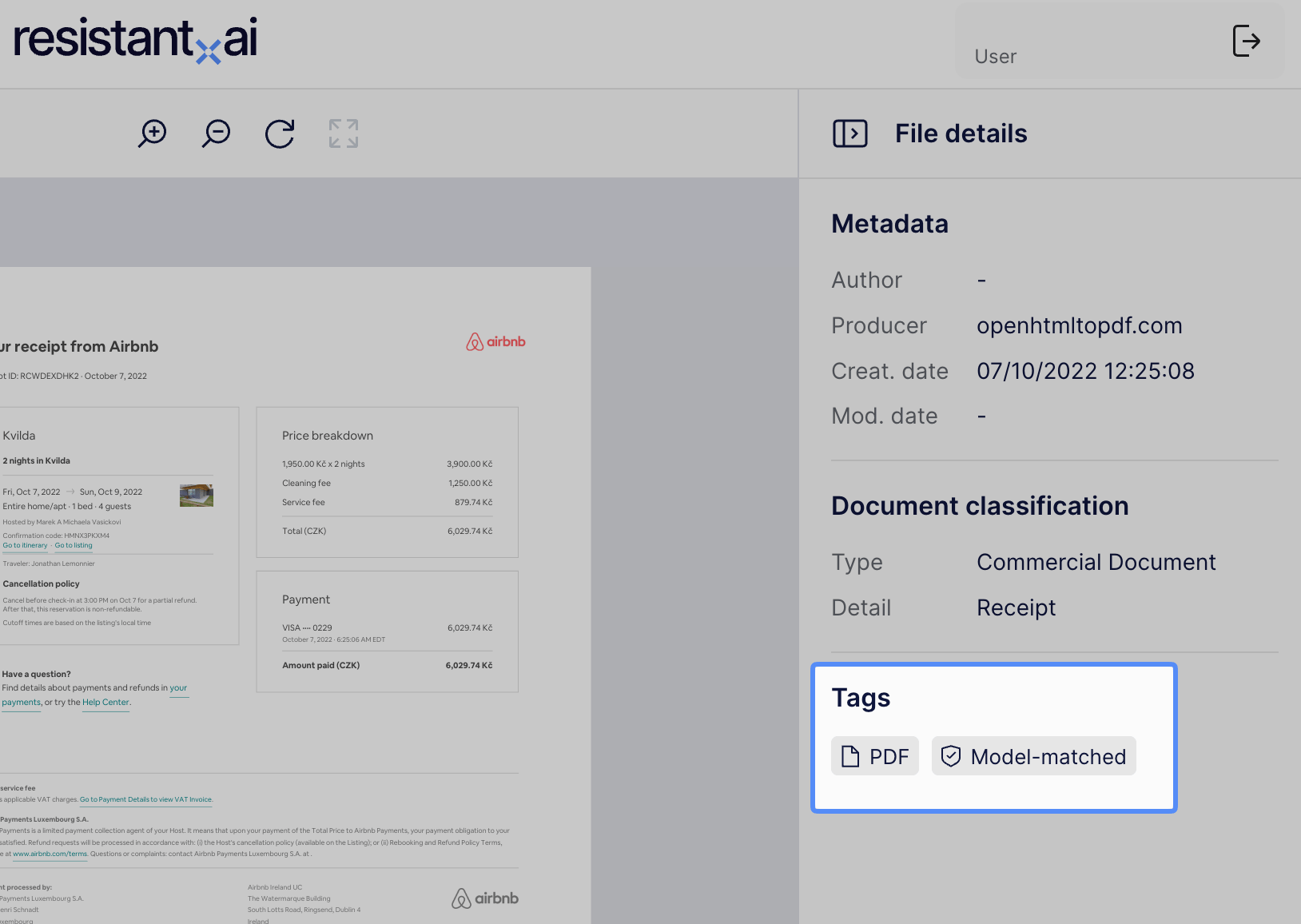 Document tags are also shows in Resistant AI's UI.
### 3) Analytics and reporting
* Store `document_tags` alongside `submission_id`, `query_id`, timestamps, and `score`
* Use tags for trend monitoring (e.g., spikes in scans from a channel)
***
## Semantics and rules
### Tags are additive
* Tags can appear in combinations
* Absence of a tag does **not** imply the opposite
* Example: missing origin `DIGITAL` does not automatically mean `SCAN` origin unless explicitly documented
### Tags are designed to be stable
* New tags may be added over time.
* Existing tags should not change meaning without an explicit deprecation process.
***
## Current tag set
### File type
* `PDF` - input files is a PDF
* `IMAGE` - input file is an image (jpeg/png/tiff, heic, etc.)
### Origin / provenance (PDF-focus)
* `DIGITAL`- PDF is digital original (native)
* `SCAN` - PDF is scan-based
Origin tags describe the likely provenance of the submitted file (digitally issued vs scanned). They are not a claim of authenticity.
### Model coverage and trust
* `MODEL_MATCHED` - a document-specific model (anomaly layer) matched the document
* `TRUSTED` - document matched a known issuer strongly enough, to be marked as trusted
***
## Backwards compatibility
Some historical submissions may not contain `document_tags`.
Recommended handling:
* If `document_tags` is missing or empty, treat it as “not available”
* Do not attempt to reconstruct tags client-side (use indicators and score instead)
***
## Implementation guidance
### Store tags as an array
Keep the original list so you can filter by membership and support future tags without schema changes.
### Handle unknown tags safely
* Allowlist the tags you actively support
* Ignore or display unknown tags without breaking
```ts theme={null}
const supported = new Set([
"PDF",
"IMAGE",
"DIGITAL",
"SCAN",
"TRUSTED",
"MODEL_MATCHED"
]);
const tags = response.document_tags ?? [];
const known = tags.filter((t) => supported.has(t));
const unknown = tags.filter((t) => !supported.has(t));
```
***
## FAQ
They are returned by the backend. The UI should render received tags and avoid recreating tag logic client-side.
No. Tags are a summary layer. Indicators are the detailed evidence.
New tags may be added. Existing tag semantics should not change without explicit deprecation/versioning.
Yes. If you have a workflow need, contact Resistant AI to discuss schema extension and governance.
Document tags are also shows in Resistant AI's UI.
### 3) Analytics and reporting
* Store `document_tags` alongside `submission_id`, `query_id`, timestamps, and `score`
* Use tags for trend monitoring (e.g., spikes in scans from a channel)
***
## Semantics and rules
### Tags are additive
* Tags can appear in combinations
* Absence of a tag does **not** imply the opposite
* Example: missing origin `DIGITAL` does not automatically mean `SCAN` origin unless explicitly documented
### Tags are designed to be stable
* New tags may be added over time.
* Existing tags should not change meaning without an explicit deprecation process.
***
## Current tag set
### File type
* `PDF` - input files is a PDF
* `IMAGE` - input file is an image (jpeg/png/tiff, heic, etc.)
### Origin / provenance (PDF-focus)
* `DIGITAL`- PDF is digital original (native)
* `SCAN` - PDF is scan-based
Origin tags describe the likely provenance of the submitted file (digitally issued vs scanned). They are not a claim of authenticity.
### Model coverage and trust
* `MODEL_MATCHED` - a document-specific model (anomaly layer) matched the document
* `TRUSTED` - document matched a known issuer strongly enough, to be marked as trusted
***
## Backwards compatibility
Some historical submissions may not contain `document_tags`.
Recommended handling:
* If `document_tags` is missing or empty, treat it as “not available”
* Do not attempt to reconstruct tags client-side (use indicators and score instead)
***
## Implementation guidance
### Store tags as an array
Keep the original list so you can filter by membership and support future tags without schema changes.
### Handle unknown tags safely
* Allowlist the tags you actively support
* Ignore or display unknown tags without breaking
```ts theme={null}
const supported = new Set([
"PDF",
"IMAGE",
"DIGITAL",
"SCAN",
"TRUSTED",
"MODEL_MATCHED"
]);
const tags = response.document_tags ?? [];
const known = tags.filter((t) => supported.has(t));
const unknown = tags.filter((t) => !supported.has(t));
```
***
## FAQ
They are returned by the backend. The UI should render received tags and avoid recreating tag logic client-side.
No. Tags are a summary layer. Indicators are the detailed evidence.
New tags may be added. Existing tag semantics should not change without explicit deprecation/versioning.
Yes. If you have a workflow need, contact Resistant AI to discuss schema extension and governance.