Amazon SQS event notifications provide an alternative to synchronous polling by notifying your systems when an analysis step completes. Events are delivered to your Amazon SQS queue, enabling scalable event-driven processing.
SQS event notifications are available subject to prior agreement and may involve an additional fee.
When to use SQS (vs polling)
Use SQS if you:
- Want to reduce polling traffic and latency-to-action
- Already operate AWS workloads and queues
- Process high volumes and prefer async consumption
Stick with polling if you:
- Want the simplest integration (no AWS infrastructure)
- Only have low/medium throughput
How it works (high level)
- Events are delivered to your SQS queue in the target region.
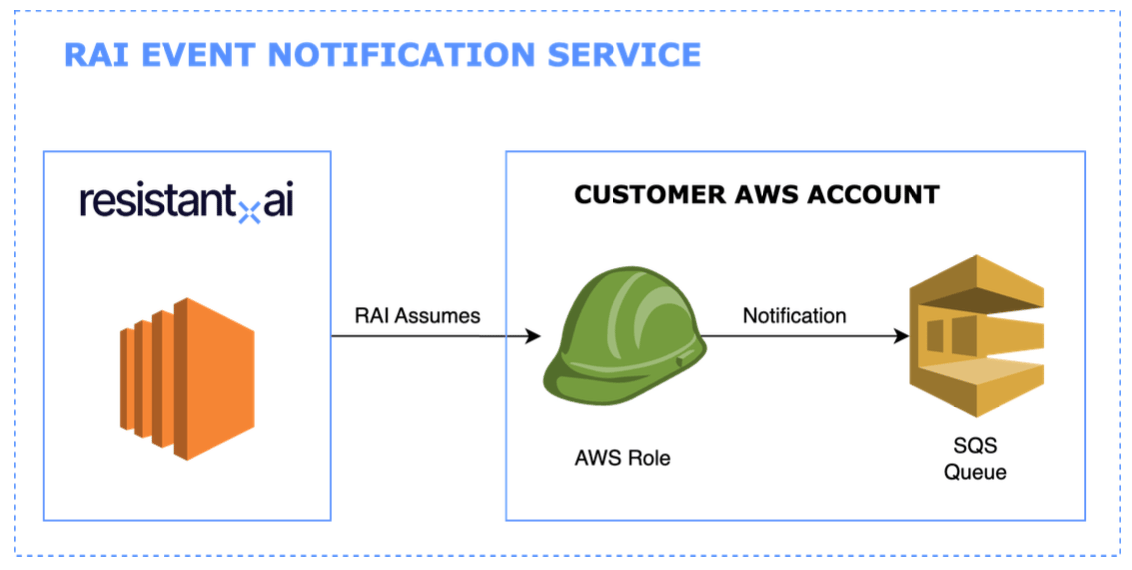
- Resistant AI assumes a role in your AWS account using AWS STS; the
tenant ID is used as ExternalId.
- Your consumer receives an event and then fetches the full result from the Documents API using
result_url.
Supported events
Event notifications are available for the following analysis outputs:
documents.analysis.fraud.finished
documents.analysis.quality.finished
documents.analysis.classification.finished
Integration steps
1) Resistant AI provides configuration details
Resistant AI provides:
- example templates for setup
- the AWS Account ID used by Resistant AI
- your tenant ID (used as
ExternalId)
You deploy:
- an SQS queue (and optionally DLQ)
- an IAM role that Resistant AI can assume
Then you provide to Resistant AI:
3) Integration testing
You and Resistant AI validate:
- the role can be assumed successfully
- messages can be published to your queue
Security and architecture notes
SQS delivery uses AWS STS AssumeRole with temporary credentials, reducing credential lifetime and avoiding static key sharing.
AssumeRole model
- Resistant AI assumes your role
ExternalId = your tenant ID
Limitations and important considerations
- Single destination: each tenant can have only one event destination.
- KMS note: a KMS key is not specified in the API call used to publish messages; your queue resource policy must support your encryption setup.
Event schema
Each SQS message contains:
{
"$schema": "https://json-schema.org/draft/2020-12/schema",
"title": "Resistant.ai document analysis event",
"type": "object",
"properties": {
"tenant_id": {
"description": "Internal Resistant.ai identifier of tenant",
"type": "string"
},
"submission_id": {
"description": "Submission identifier as produced by the create submission request",
"type": "string"
},
"query_id": {
"description": "User-defined ID of analyzed file as given in the create submission request",
"type": "string",
"nullable": true
},
"event_type": {
"description": "Type of event: documents.analysis.fraud.finished or documents.analysis.quality.finished or documents.analysis.classification.finished",
"type": "string"
},
"status": {
"description": "Status of the analysis step result",
"type": "string",
"enum": ["SUCCESS", "SKIPPED", "INVALID_INPUT", "FAILED"]
},
"score": {
"description": "Result of the analysis. Content depends on event_type. Examples: NORMAL/TRUSTED/WARNING/HIGH_RISK (fraud); HIGH_QUALITY/LOW_QUALITY/NOT_RELEVANT_DOCUMENT (quality); CLASSIFIED/DOCUMENT_MISSING/NOT_CLASSIFIED (classification).",
"type": "string",
"nullable": true
},
"result_url": {
"description": "URL where more details about the analysis result can be fetched with a GET request",
"type": "string"
}
}
}
Typical Consumer Pattern
import boto3, json
sqs = boto3.client("sqs", region_name="eu-west-1")
queue_url = "https://sqs.eu-west-1.amazonaws.com/123456789/my-rai-queue"
while True:
messages = sqs.receive_message(QueueUrl=queue_url, MaxNumberOfMessages=10, WaitTimeSeconds=20)
for msg in messages.get("Messages", []):
event = json.loads(msg["Body"])
if event["status"] == "SUCCESS":
fetch_details(event["result_url"]) # GET the result_url
sqs.delete_message(QueueUrl=queue_url, ReceiptHandle=msg["ReceiptHandle"])